Jun 20, 2017

Hosting a PHP page from a yaws server using FastCGI on WINDOWS

If you are looking for a way to host or run a PHP page on YAWS server using PHP FastCGI process, just follow the below steps.


  • Place the PHP file/s in doc root folder
  • Change the yaws.conf file to redirect PHP script to run on FastCGI service.
                <server localhost>
                        port = 9009 
                        listen = 0.0.0.0
                        docroot = "C:\Program Files (x86)\Yaws-2.0.2/test"
                        auth_log = true
                        appmods = <cgi-bin, yaws_appmod_cgi>
                        php_handler = <fcgi, 127.0.0.1:54321>
                </server>

  • Start the YAWS server and confirm the errors.
  • Start the php FastCGI service.
    • To start on Windows: 
      • Download the XAMPP application from the below link and install it.
      • https://www.apachefriends.org/download.html
      • c:\xampp\php>php-cgi.exe -b 127.0.0.1:54321


Apr 20, 2017

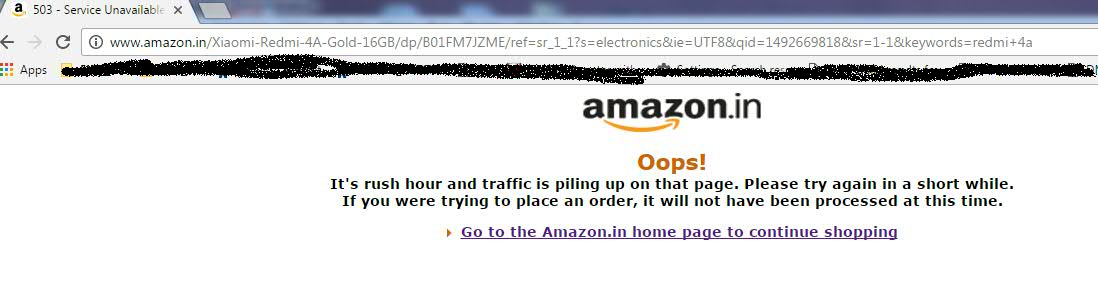
amazon.in 503 service unavailable - oops Red Mi 4A sales

Amazon Red Mi 4A sales are huge. Due to this amazon.in website access got slowdown and during the peak time shown 503 services unavailable page from amazon.in


It's rush hour and traffic is piling up on that page. Please try again in a short while.If you were trying to place an order, it will not have been processed at this time.


Aug 11, 2015

rsh Permission denied error fix?

RSH command execution is throwing permission denied error as shown below.


host1> /usr/bin/rsh -l user1 host2 "ls /user1"
Permission denied.

Reason: host2 machine user1 home directory missing .rhosts file

FIX: Connect host2 machine, goto user1 home directory and create .rhosts file.
Provide the file permission as 0600 to file .rhosts and try RSH command now.. :)


May 15, 2015

How to get the unused or free IPs on linux machine?

 Inline format of the script:
lsof -nl >/tmp/lsof.log;rm -rf ~/freeIPs.log; for ip in `ip add list|grep -v "127.0.0\|::1\|0.0.0.0\|00:00:"|cut -d" " -f6|cut -d"/" -f1|grep -v qdisc|awk 'NF'`;do grep $ip /tmp/lsof.log > /dev/null; if [ $? != 0 ]; then echo $ip >> ~/freeIPs.log; fi; done; rm -rf /tmp/lsof.log;echo "Total IPs:`ip add list|grep -v "127.0.0\|::1\|0.0.0.0\|00:00:"|cut -d" " -f6|cut -d"/" -f1|grep -v qdisc|awk 'NF'|wc -l`"; echo "Free IPs:`wc -l ~/freeIPs.log`";

Script:

 lsof -nl >/tmp/lsof.log
 rm -rf ~/freeIPs.log
 for ip in `ip add list|grep -v "127.0.0\|::1\|0.0.0.0\|00:00:"|cut -d" " -f6|cut -d"/" -f1|grep -v qdisc|awk 'NF'`
 do 
     grep $ip /tmp/lsof.log > /dev/null
     if [ $? != 0 ]
    then 
          echo $ip >> ~/freeIPs.log
    fi
 done
 rm -rf  /tmp/lsof.log
 echo "Total IPs:`ip add list|grep -v "127.0.0\|::1\|0.0.0.0\|00:00:"|cut -d" " -f6|cut -d"/" -f1|grep -v qdisc|awk 'NF'|wc -l`";
 echo "Free IPs:`wc   -l ~/freeIPs.log`";

Sep 5, 2014

Sample in-line unix "for" loop command eaxmples.

home>for i in {307,306,311} ; do echo $i; done
output:
307
306
311

home> for i in {307,306,311} {374..376} ; do echo $i; done
output:
307
306
311
374
375
376